Printing via SDK
Through the SDK, it is possible to request the terminal to print information using a text string or Base64 content of a bitmap.
For this, the library payments-api-x.x.x.x.aar is provided, containing the necessary functions for such applications.
Flow
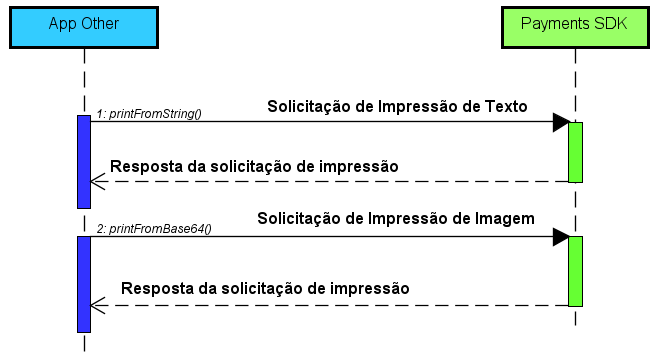
| Steps | Success | Error |
|---|---|---|
| 1. Print request | The print was successfully executed. | The print was not executed, and the reason is found in the response. |
| 2. Print request response | Once printed, no additional information is available about the print. | The response contains information about the issue that prevented printing. |
Permissions
To use the functionalities provided in the implementation, it is necessary to include the permission below.
<uses-permission android:name="br.com.android.payments.print.provider.READ_PERMISSION" />
Methods
| Signature | Description |
|---|---|
void printFromString(Context context, String stringContent, PaymentCallback callback) |
Requests printing of text from a string (String). |
void printFromBase64(Context context, String base64Content, PaymentCallback callback) |
Requests printing of an image from Base64 content sent as a string. |
printFromString()
When there is a need to print content in textual format, the printFromString() method can be used.
Parameters
| Name | Type | Required | Description |
|---|---|---|---|
context |
Context |
Yes | The application context requesting the print function. |
stringContent |
String |
Yes | The string content to be printed. |
printFeed |
Boolean |
Yes | If the parameter is equal to true, at the end of the receipt print will have a space. If false, there will be no spacing at the end of the receipt print |
callback |
PaymentCallback |
Yes | Interface executed for success or error notifications of the process. |
When printing a string there is no limit to the number of characters per line, as the terminal automatically adjusts to the content. However, it is not recommended to include a large number of characters without performing line breaks.
Warning
When there is a long sequence of consecutive characters without a line break, the output will be adjusted automatically, and a line break will be inserted every 500 characters if there are no spaces in between.
printFromBase64()
When the need is to print an image, the printFromBase64() method can be used. This method requires that the image be previously converted to a valid Base64 format before being passed for printing.
| Name | Type | Required | Description |
|---|---|---|---|
context |
Context |
Yes | The application context requesting the print. |
base64Content |
String |
Yes | The visual content to be printed in Base64 format. |
printFeed |
Boolean |
Yes | If the parameter is equal to true, at the end of the receipt print will have a space. If false, there will be no spacing at the end of the receipt print |
callback |
PaymentCallback |
Yes | Interface executed for success or error notifications of the process. |
A valid Base64 is considered one that can be converted into one of the following image formats:
| 1 channel per pixel | 3 channels per pixel | 4 channels per pixel |
|---|---|---|
An image where each pixel contains only 1 channel (Alpha) (ALPHA_8). |
An image where each pixel contains 3 channels (Red, Green, and Blue) (RGB_565). |
An image where each pixel contains 4 channels (Alpha, Red, Green, and Blue) (ARGB_8888 or ARGB_4444). |
Example
public class MyActivity extends Activity implements PaymentClient.PaymentCallback {

  private static final String TAG = "receipt_printing";
  private PaymentClient paymentClient;

  @Override
  protected void onCreate(Bundle savedInstanceState) {
    super.onCreate(savedInstanceState);
    setContentView(R.layout.activity_payment);

    paymentClient = new PaymentClientImpl();
  }

  @Override
  protected void onResume() {
    super.onResume();
    paymentClient.bind(this);
  }

  @Override
  protected void onDestroy() {
    try {
      paymentClient.unbind(this);
    } catch (Exception e) {
      Log.e(TAG, e.getMessage());
    }
    super.onDestroy();
  }

  public void printText(View view) {
    String text = "This is a text printing example.\n"
      + "Notice that after the '\n', there will be a line break on the receipt.\n"
      + "Also, note that the printout will adjust to the number of characters "
      + "and the character printing capacity per line.";

    try {
      paymentClient.printFromString(getApplicationContext(), text, true, this);
    } catch (ClientException e) {
      Log.e(TAG, "Error printing text", e);
    }
  }

  public void printBase64(View view) {
    String base64 = "iVBORw0KGgoAAAANSUhEUgAAAAIAAAACCAIAAAD91JpzAAAAAXNSR0IArs4c6QAAAARnQU1BAACxjwv8YQUAAAAJcEhZcwAAFiUAABYlAUlSJPAAAAARSURBVBhXY3growJEYEpGBQAkHgS13mWMCAAAAABJRU5ErkJggg==";

    try {
      paymentClient.printFromBase64(getApplicationContext(), base64, true, this);
    } catch (ClientException e) {
      Log.e(TAG, "Error printing Base64 image", e);
    }
  }

  @Override
  public void onError(ErrorData errorData) {
    Log.e(TAG, "The following error occurred: " + errorData.getResponseMessage());
  }

  @Override
  public void onSuccess(Object o) {
    Log.i(TAG, "The receipt was printed successfully!");
  }
}