Integration with Void / Refund V2
One of the ways to integrate with the Phoebus payment application is via IPC. A library is provided for this, payments-api-x.x.x.x.aar , containing all the code needed to be used for such calls.
Using this API, it is possible to carry out the entire payment flow, that is, confirmation (or undoing) and reversal. Payment can be made with a pre-defined amount or with an open amount, to be entered by the terminal operator. In addition, you can inform a list of payment types (debit, cash credit, credit in installments, etc.) allowed.
Although this integration takes place through an API, the payment application can display information on the terminal interface, such as messages (e.g., "Insert or swipe the card"), or even request information from the operator (e.g., CVV). Therefore, while performing any operation, the application that requested the operation must not interact with the device's interface until the operation is completed.
The following is a detailed specification of available operations.
For payment API integration, the PaymentClient interface is provided.
Void / Refund Flow
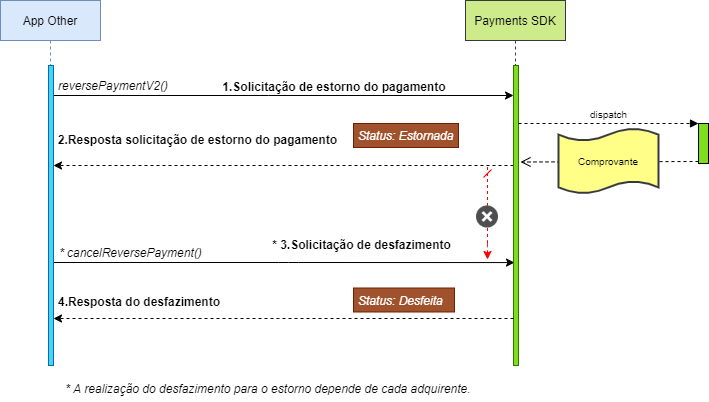
| Steps | Success | Error |
|---|---|---|
| 1.Payment reversal request | The payment has been reversed and its status is Refunded |
The payment was not refunded. The response contains error information. |
| 2.Response to payment reversal request | The response contains information about the reversal of the payment made. | The response contains request error information. |
| 3.Request to undo the chargeback | Undo performed, its status is Undo. |
The response contains request error information. |
| 4.Chargeback undo response | The response contains information from the undo performed. | The response contains request error information. |
The reversal is only finalized when there is a confirmation or an undo. In case of confirmation, the receipt will be printed.
Warning
The PaymentClient.Bind(_callback) method must be called before calling any Payment Integration method. The bind is asynchronous, i.e. the next line after the bind() will be executed before receiving your response, so make sure that before calling the integration methods, the bind is connected .
From version 3.1.5.0
When a transaction is made, it could previously be confirmed by printing it (or via printReceipt), or by making a new transaction. Now, the reversal can also be confirmed by using the new autoConfirm parameter - indicating whether or not to confirm regardless of printing - or by using the new confirmReversePayment() method.
Methods
| Signature | Description |
|---|---|
void reversePaymentV2(ReversePaymentRequestV2 paymentRequest, PaymentCallback paymentCallback) |
Performs the payment reversal process. |
void confirmReversePayment(String paymentId, PaymentCallback paymentCallback) |
Confirms a previously made payment reverse authorization. |
void cancelReversePayment(String paymentId, PaymentCallback paymentCallback) |
Undo a chargeback request. |
reversePaymentV2()
This method must be called when you want to make a payment reversal request. During its execution, the chargeback data will be validated, additional information will be requested from the operator (e.g. card) and authorization will be made with the acquirer.
Note that the chargeback transaction has no confirmation, only undo. Thus, confirmation will naturally occur when the undo is not sent, depending on the behavior of each acquirer.
If there is a printout of the chargeback receipt, when any of the printMerchantReceipt or printCustomerReceipt parameters with value true is passed, the chargeback will be confirmed automatically. In this case, undoing will not be allowed.
Also depending on the behavior of each acquirer, it is possible that there is no undo for the reversal transaction. In this case, approved chargebacks will return the value false in the "ReversePayment.cancelable" field. Furthermore, if the cancelReversePayment() method is called, a specific error will be returned stating that it is not possible to perform such an operation (see Response Codes).
Parameters
| Name | Type | Mandatory | Description |
|---|---|---|---|
request |
ReversePaymentRequestV2 |
Yes | Data transfer object that will contain the payment reversal request information. Note that not all parameters are required. |
callback |
ReversePaymentCallback |
Yes | Interface that will be executed for success or error notifications of the chargeback process. |
Parameter details
request (ReversePaymentRequestV2)
| Name | Type | Mandatory | Description |
|---|---|---|---|
value |
BigDecimal |
No | Transaction amount to be reversed. If it is not filled in (null), the interface will ask the operator for the value. This information is used to validate the integrity of the transaction being reversed. The value must be formatted with two decimal places. |
paymentId |
String |
Yes | Identifier of the transaction to be reversed. The identifier referred to is the one used in the payment application. |
appTransactionId |
String |
Yes | Integrated transaction identifier. The identifier referred to is that of the application that originated the chargeback request. It must be the same amount sent in the payment transaction. |
ApplicationInfo.credentials |
Credentials |
Yes | Credentials of the application that is requesting the operation, as registered at PayStore. Basically, it's about the application ID and the access token. |
ExternalAppVersion |
String |
No | Version of the application that is requesting payment. |
showReceiptView (DEPRECATED) |
Boolean |
No | The Solution will use the value of the printMerchantReceipt and printCustomerReceipt parameters to print. |
printMerchantReceipt |
Boolean |
No | Indicates whether the establishment voucher should be printed or not. The default value is false, that is, the voucher is not printed. |
printCustomerReceipt |
Boolean |
No | Indicates whether the customer receipt should be printed or not. The default value is false, that is, the voucher is not printed. |
previewMerchantReceipt |
Boolean |
No | Indicates whether the merchant voucher preview screen should be displayed after confirming the transaction. The default value is true, which means the voucher will be displayed. |
previewCustomerReceipt |
Boolean |
No | Indicates whether the customer voucher preview screen should be displayed after confirming the transaction. The default value is true, which means the voucher will be displayed. |
autoConfirm (v3.1.5.0) |
Boolean |
No | Indicates whether the transaction should be confirmed automatically. Possible values: 1. null (default) : confirms automatically if the receipt is printed.2. true : confirms automatically regardless of the printing rule.3. false : does not confirm automatically, pending confirmation. |
merchantGroupCode |
String |
If allowMultimerchant= true, groupCode is required |
Merchant group code. |
callback (ReversePaymentCallback)
| Name | Type | Mandatory | Description |
|---|---|---|---|
onSuccess |
Method for notification on success | ||
ReversePayment.paymentId |
String |
Yes | Reversal transaction identifier. The Identifier referred to is the one used in the payment application. This is the information to use for commit and undo. |
ReversePayment.acquirerId |
String |
Yes | Chargeback transaction identifier for the acquirer. This is the identifier that appears in the file that the acquirer provides (EDI). In this way, it is possible to perform the reconciliation of the reversal with the integrated transaction. |
ReversePayment.cancelable |
Boolean |
Yes | True, if this transaction can be undone; False otherwise. |
ReversePayment.acquirerResponseCode |
String |
Yes | Acquirer response code. |
ReversePayment.acquirerResponseDate |
String |
Yes | Date/time returned by the acquirer. |
ReversePayment.acquirerAuthorizationNumber |
String |
Yes | Authorization number provided by the acquirer (it appears on the Cardholder's customer receipt). |
ReversePayment.Receipt.clientVia |
String |
No | Voucher content - customer's copy. |
ReversePayment.Receipt.merchantVia |
String |
No | Content of the voucher - copy of the establishment. |
ReversePayment.acquirerAdditionalMessage |
String |
No | Additional message sent by the acquirer in the transaction response. |
ReversePayment.ticketNumber |
String |
No | Coupon number generated by the terminal for the transaction. |
ReversePayment.batchNumber |
String |
Yes | Lot number. |
ReversePayment.nsuTerminal |
String |
Yes | NSU generated by the terminal for the transaction. |
ReversePayment.cardholderName |
String |
No | Cardholder name. |
ReversePayment.cardBin |
String |
Yes | First six digits of the card. |
ReversePayment.panLast4Digits |
String |
Yes | Last four digits of the card. |
ReversePayment.terminalId |
String |
Yes | Terminal ID. |
ReversePayment.correlationId |
String |
Yes | Common transaction identifier between terminal, PhAST and PayStore. This identifier in UUID format is unique for each transaction |
onError |
Method for notification in case of error. | ||
ErrorData.paymentsResponseCode |
String |
Yes | Response code for the error that occurred. See Response Codes |
ErrorData.acquirerResponseCode |
String |
No | Response code for the occurred error returned by the acquirer. Note that this error will only be returned if the transaction is not authorized by the acquirer. |
ErrorData.acquirerAdditionalMessage |
String |
No | Additional message sent by the acquirer in the transaction response. |
ErrorData.responseMessage |
String |
Yes | Descriptive message of the reason for the non-authorization. If the transaction was denied by the acquirer, it will contain the message returned by the acquirer. |
confirmReversePayment()
This method must be called to confirm a reversal that the terminal has managed to fully process the authorization leg sent by the Authorizer.
This method should not be called for a chargeback that has already been confirmed, i.e. where the confirmReversePayment() method has already been executed.
This method should not be called for a reversal that has already been undone, i.e. where the cancelReversePayment() method has already been executed.
This no method must be called for a reversal that has been denied by the Authorizer, i.e. the transaction must have been authorized by the Authorizer.
Parameters
| Name | Type | Mandatory | Description |
|---|---|---|---|
paymentId |
String |
Yes | Identifier of the transaction to be confirmed. The Identifier referred to is the one used in the payment application. |
callback |
PaymentCallback |
Yes | Interface that will be executed for success or error notifications. |
Parameter details
callback
| Name | Type | Mandatory | Description |
|---|---|---|---|
onSuccess |
Method for notification on success | ||
onError |
Method for notification in case of error. | ||
ErrorData.paymentsResponseCode |
String |
Yes | Response code for the error that occurred. See Response Codes |
ErrorData.acquirerResponseCode |
String |
No | Response code for the occurred error returned by the acquirer. Note that this error will only be returned if the transaction is not authorized by the acquirer. |
ErrorData.responseMessage |
String |
Yes | Descriptive message of the reason for the non-authorization. If the transaction was denied by the acquirer, it will contain the message returned by the acquirer. |
cancelReversePayment()
This method must be called to undo a previously authorized chargeback transaction. This transaction must not have been rolled back yet and must have been authorized (not denied) previously.
As stated in the description of reversePayment(), it is possible that there is no undo for the chargeback transaction for a given acquirer. Thus, the cancelReversePayment() method may return a specific error stating that it is not possible to perform such an operation (see Response Codes).
Parameters
| Name | Type | Mandatory | Description |
|---|---|---|---|
paymentId |
String |
Yes | Identifier of the transaction to be rolled back. The Identifier referred to is the one used in the payment application. |
callback |
PaymentCallback |
Yes | Interface that will be executed for success or error notifications. |
Parameter details
callback
| Name | Type | Mandatory | Description |
|---|---|---|---|
onSuccess |
Method for notification on success | ||
onError |
Method for notification in case of error. | ||
ErrorData.paymentsResponseCode |
String |
Yes | Response code for the error that occurred. See Response Codes |
ErrorData.acquirerResponseCode |
String |
No | Response code for the occurred error returned by the acquirer. Note that this error will only be returned if the transaction is not authorized by the acquirer. |
ErrorData.responseMessage |
String |
Yes | Descriptive message of the reason for the non-authorization. If the transaction was denied by the acquirer, it will contain the message returned by the acquirer. |
Example of the Chargeback flow
import androidx.appcompat.app.AppCompatActivity;

import android.content.Intent;
import android.os.Bundle;
import android.util.Log;
import android.view.View;
import android.widget.Button;
import android.widget.Toast;

import java.math.BigDecimal;

import br.com.phoebus.android.payments.api.Credentials;
import br.com.phoebus.android.payments.api.ErrorData;
import br.com.phoebus.android.payments.api.PaymentClient;
import br.com.phoebus.android.payments.api.ReversePayment;
import br.com.phoebus.android.payments.api.ReversePaymentRequestV2;
import br.com.phoebus.android.payments.api.exception.ClientException;

public class MainActivity extends AppCompatActivity implements View.OnClickListener, PaymentClient.PaymentCallback<ReversePayment> {

    Button bt_start;
    private PaymentClient paymentClient;
    public static final String TEST_APPLICATION_ID = "0";
    public static final String TEST_SECRET_TOKEN = "000000000000000000000000";
    public static final String TAG = "TAG_DEMO";

    @Override
    protected void onCreate(Bundle savedInstanceState) {
        super.onCreate(savedInstanceState);
        setContentView(R.layout.activity_main);
        bt_start = (Button) this.findViewById(R.id.button);
        bt_start.setOnClickListener(this);
        paymentClient = new PaymentClient();

    }


    @Override
    public void onClick(View view) {
        doExecute();
    }

    @Override
    protected void onResume() {
        super.onResume();
        paymentClient.bind(this);
    }

    @Override
    protected void onDestroy() {
        try {
            paymentClient.unbind(this);
        } catch (Exception e) {
            Log.e(TAG, e.getMessage());
        }
        super.onDestroy();
    }

    public void doExecute(){
        ReversePaymentRequestV2 request = new ReversePaymentRequestV2();
        BigDecimal value = BigDecimal.valueOf(5000).movePointLeft(2);
        request.setValue(value);
        request.setAppTransactionId("123456");

        request.setPaymentId("999999");
        request.setPrintCustomerReceipt(true);
        request.setPrintMerchantReceipt(true);

        Credentials credentials = new Credentials();
        credentials.setApplicationId(TEST_APPLICATION_ID);
        credentials.setSecretToken(TEST_SECRET_TOKEN);

        request.setCredentials(credentials);

        try {
            paymentClient.reversePaymentV2(request, this);
        } catch (ClientException e) {
            Log.e(TAG, "Error reversePaymentV2", e);
        }
    }


    @Override
    public void onSuccess(ReversePayment  reversePayment) {
        Log.i(TAG, reversePayment.toString());

        /*
          If, in your business rule, you need to undo the
          transaction for some reason, call the method
          cancelReversePayment()
        **/
        //doCancelReversePayment(reversePayment);

    }

    @Override
    public void onError(ErrorData errorData) {
        Log.e(TAG, errorData.getResponseMessage());
        Toast.makeText(this, errorData.getResponseMessage(), Toast.LENGTH_LONG).show();
    }

    private void doCancelReversePayment(ReversePayment reversePayment) {
        try {
            paymentClient.cancelReversePayment(reversePayment.getPaymentId(),
                    new PaymentClient.PaymentCallback<ReversePayment>() {

                        @Override
                        public void onError(ErrorData errorData) {
                            Log.e(TAG, errorData.getResponseMessage());
                            Toast.makeText(MainActivity.this, errorData.getResponseMessage(), Toast.LENGTH_LONG).show();
                        }

                        @Override
                        public void onSuccess(Object o) {
                            Log.i(TAG, "Undo Completed!");
                        }


                    });
        } catch (ClientException e) {
            Log.e(TAG, "Error cancelReversePayment", e);
        }


    }


}