Configuring Project
Adding Integration lib to Project
Go into your project's <project>\app and create a folder called libs. Download the latest version of the lib payments-api-x.x.x.x.aar and copy it to the folder created in your project.
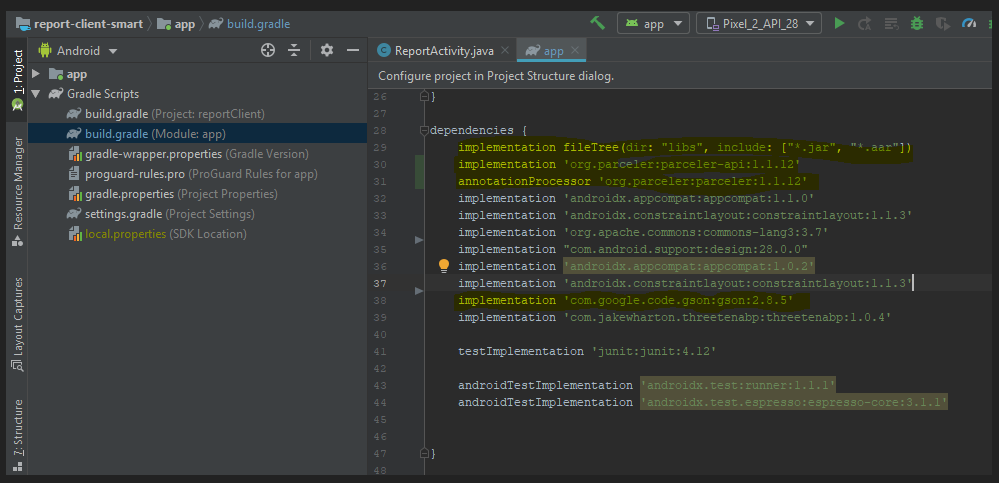
After that, open the build.gradle file (Module app) and add the following highlighted dependencies:
    implementation fileTree(dir: "libs", include: ["*.jar", "*.aar"])
    implementation 'org.parceler:parceler-api:1.1.12'
    annotationProcessor 'org.parceler:parceler:1.1.12'
    implementation 'com.google.code.gson:gson:2.8.5'
Android permissions (AndroidManifest.xml)
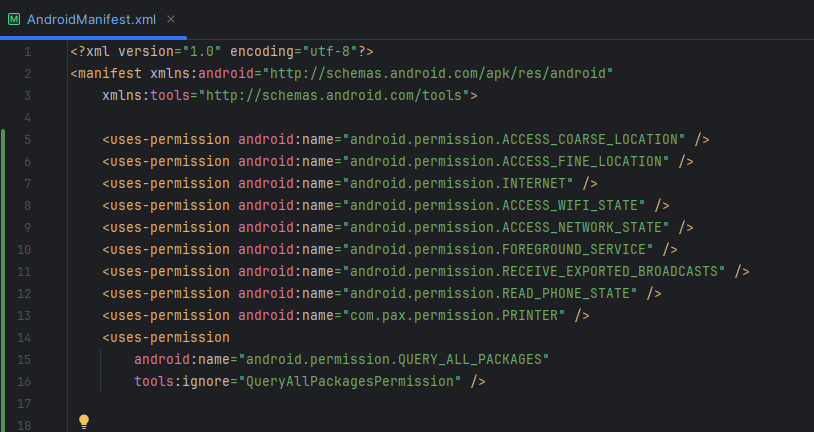
For better integration with the API is important and necessary that the application that will make use of the API, add some permissions from Android.
If any manufacturer’s specific Android permission is required, contact the manufacturer for instructions.
The following is a list of some recommended permissions.
    <uses-permission android:name="android.permission.ACCESS_COARSE_LOCATION" />
    <uses-permission android:name="android.permission.ACCESS_FINE_LOCATION" />
    <uses-permission android:name="android.permission.INTERNET" />
    <uses-permission android:name="android.permission.ACCESS_WIFI_STATE" />
    <uses-permission android:name="android.permission.ACCESS_NETWORK_STATE" />
    <uses-permission android:name="android.permission.FOREGROUND_SERVICE" />
    <uses-permission android:name="android.permission.RECEIVE_EXPORTED_BROADCASTS" />
    <uses-permission android:name="android.permission.READ_PHONE_STATE" />
    <uses-permission android:name="com.pax.permission.PRINTER" />
    <uses-permission
        android:name="android.permission.QUERY_ALL_PACKAGES"
        tools:ignore="QueryAllPackagesPermission" />
Warning
In the build.gradle of the application you are integrating, in the buildTypes field, use the isMinifyEnabled parameter equal to false, to avoid problems related to the compression of the application that is using the payment lib.
Done! Your project is already configured and you will have access to the classes available in lib.
See API References.
Configuring project for debug
If your application is being developed to run on POS terminals (Point Of Service), it is important that your application be published at Paystore as soon as possible, even if it's still in the beginning.
This is necessary so that the terminal does not automatically remove your application when it identifies that the app is not present in the Paystore store. So don't waste time and publish your app as soon as possible. See how simple it is here, If necessary, contact our support.